Match rates play a crucial role in how well platforms like Meta, Google, and CRM tools can recognize your customers and deliver accurate targeting. When these match rates start to fall, your ads reach fewer right-fit users, optimization slows down, and a big chunk of your ad spend gets wasted.
The good news? Most of these issues come down to poor data hygiene, and they’re completely fixable.
In this blog, we will explore why match rates are declining, how this affects audience precision, and the practical data hygiene steps you can take to enhance your advertising performance.
Jump ahead to:
What is Match Rates
Match rate is essentially a percentage that shows how many of your customers or data records a platform can successfully match to existing user IDs in its system. For example, if you upload a list of 10,000 emails and the platform finds matches for 7,000 of them, your match rate would be 70%. The match rate is the percentage of your uploaded customer list that could be matched to Google users. Source
Why Platforms Depend on Accurate Match Signals
Platforms like Meta, Google, and CRM tools rely heavily on clean, accurate match signals because they use this data to:
- Identify who your users are (so they can show them the right ads)
- Optimise campaigns (making decisions about bidding, delivery, and creative) based on actual user behaviour
- Attribute conversions correctly (linking a purchase or sign-up back to the campaign or ad that triggered it)
If the data is incomplete, outdated, or badly formatted, the platform can’t match users reliably. For example, according to Meta’s guidance, using a strong identifier set (email, phone, hashed identifiers) helps improve match rates and signal quality. When match signals are accurate and robust, platforms can build better custom audiences, generate more precise lookalikes, and optimise for conversions more effectively.
Why Match Rates Are Falling Today
One of the biggest reasons match rates keep dropping across Meta, Google, and CRM platforms is simply bad or inconsistent data. Platforms can only match a customer if the information you send actually lines up with what they have in their system.
When your identifiers-like emails, phone numbers, or device details, are messy, incomplete, or incorrectly formatted, the platforms fail to recognize the user. And when they can’t recognize the user, your match rates fall, which directly impacts targeting accuracy and ad performance.
Poor Data Quality and Formatting Issues
Unclean or Incomplete User Identifiers
Match rates drop sharply when the data you send is missing key identifiers or contains errors. Common issues include:
- Emails with typos (e.g., gmail.com, yaho.com)
- Phone numbers missing country codes
- Users with only one identifier instead of multiple
- CRM records with blank fields or outdated contact info
- Extra spaces, special characters, or uppercase/lowercase inconsistencies
When your first-party data isn’t clean or complete, Meta and Google struggle to match it to real users, leading to lower match rates and weaker audience precision.
Incorrect Hashing, Formatting, or Casing
Match rates also fall when data isn’t prepared correctly before being sent to the platform. Common formatting mistakes include:
- Hashing emails or phone numbers incorrectly
- Hashing data before cleaning it, which makes it unmatchable
- Capital letters in emails or phone numbers
- Phone numbers sent without proper formatting (e.g., adding spaces or brackets)
- Inconsistent naming conventions across systems
Platforms like Meta and Google expect data in a very specific format, and even tiny errors can lead to failed matches. That’s why “better data hygiene” is critical for maintaining high match rates.
Missing Key User Identifiers
- Email or phone not captured: Sometimes, important pieces of data like email or phone are not collected during customer interactions (for example, in checkout flows). Without these core identifiers, match rates drop because there’s less to match against.
- CRM gaps: Your CRM might be missing other useful data, like location, device type, or timestamps. These additional identifiers help platforms verify and match users more precisely.
Cross-Domain & Cross-Platform Fragmentation
- Multi-domain checkouts: If your customers move across different domains, the tracking system may treat them as separate users unless set up correctly. This fragmentation makes matching harder.
- Multiple systems with disconnected identities: When you use different tools (CRM, website, ad platform) that don’t talk to each other, you end up with fragmented user identities. One system might know a person by email, another by device ID – but without stitching them together, the match rate suffers. This is called “identity fragmentation,” and it means platforms can’t reliably connect the dots.
Also Read: Improve your Facebook (Meta) Event Match Quality Score
How Low Match Rates Hurt Your Advertising Performance
Poor Audience Targeting
When your match rate is low, platforms like Meta and Google don’t have enough clean data to understand who your real customers are.
What happens:
- Your retargeting audiences become smaller or incomplete
- Lookalike audiences become broad and less accurate
- Platforms struggle to find people similar to your best customers
Impact:
- Your ads reach fewer interested people
- Relevance drops, competition increases
- Cost per result goes up
- You end up paying more for weaker traffic
It’s like trying to find your ideal customer in a crowd but having only half the clues.
Slower Optimization
Ad algorithms learn from the signals you send – purchases, add-to-carts, leads, etc.
When match rates are low, the platform receives partial or incomplete events.
What happens:
- Meta/Google can’t understand which users are converting
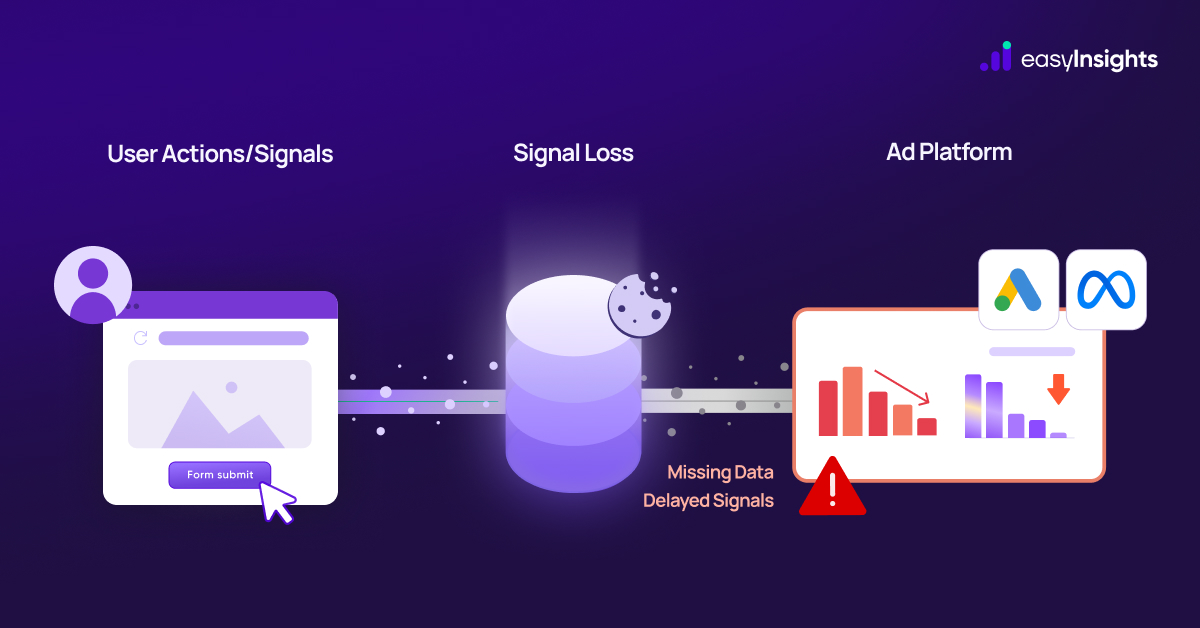
- Signals become weak or delayed
- The learning phase stretches longer
- Campaigns become unstable and require constant corrections
Impact:
- Slower scaling
- Higher cost per conversion
- Inconsistent daily performance
- More learning resets and fluctuations
It’s like trying to teach the algorithm with missing chapters – it never fully understands what “success” looks like.
Broken Attribution
If conversions don’t match back to the right users, platforms undercount your results.
What happens:
- Purchases and leads go untracked
- Events get lost due to pixel blocks, missing parameters, or identifier mismatches
- Platform dashboards show fewer conversions than you actually got
Impact:
- Underreported ROAS
- Incorrect CPA
- Misleading MER
- Wrong assumptions about which campaigns work
- Poor budget allocation
You may end up cutting good campaigns or scaling the wrong ones just because the data is incomplete.
Data Hygiene: The Secret to Better Match Rates
Maintaining clean and well-structured first-party data – data hygiene – isn’t just a boring backend thing. It’s one of the most powerful levers you can pull to boost your match rates on Meta (and other ad platforms) and make sure your ads are working on strong, accurate signals. Here’s how you can improve data hygiene in 5 practical ways:
5.1 Standardizing User Identifiers
- Email normalization: Always convert emails to a consistent format before sending them to platforms like Meta. Lowercasing everything, removing spaces, and trimming extra characters helps ensure that what you send matches what Meta has stored for their users. This improves matching accuracy.
- Phone number formatting: Make sure phone numbers include country codes, remove special characters (like brackets or dashes), and follow a standard format. When the same phone number is normalized, platforms can match much more reliably.
- Proper hashing: Before sending personally identifiable data (like email or phone) to Meta via Conversions API, hash it using. This is a security and privacy best practice, and Meta themselves recommends this to improve data match quality.
5.2 Filling CRM Data Gaps
- Ensure key identifiers are collected: Make sure your CRM captures essential customer data email, phone number, location, and name. The more identifiers you collect (while respecting privacy), the better the platform can match those users to its profiles.
- Consistent event-level user identifiers: When you fire conversion events (like leads, purchases), send user info (email, phone) with the event. This creates a stronger match because Meta can tie the event to a real user in its system.
5.3 Eliminating Duplicate Records
- Merge duplicates: Often in CRMs or data warehouses, the same person is saved twice (or more) with slightly different details – different email versions, phone numbers, or name formats. Regularly cleaning and merging these records helps.
- Consolidate customer profiles from multiple sources: If you collect customer data from multiple places (web, app, offline), bring it into a unified system so you avoid fragmented identities. This helps ad platforms match your CRM data to users more precisely.
5.4 Using Both Pixel + CAPI Together, Correctly
- Browser + server events unified: The best and most recommended setup is a hybrid one – send data both via the Meta Pixel (in the browser) and via CAPI from your server. This ensures you don’t miss events due to browser restrictions.
- Event deduplication via event_id: To avoid counting the same event twice (once from Pixel, once from CAPI), use a unique event_id. When both Pixel and CAPI events share the same event_id and event name, Meta will dedupe and count it once.
- Best practices: Use a redundant data setup where the same set of events is sent through both Pixel and CAPI. Meta’s official playbook recommends deduplication keys for each event. Source
5.5 Tracking Across Multi-Domain Flows
- Proper UTM carryover: If your customers navigate across multiple domains (say, from shop.yourbrand.com to checkout.yourbrand.com), make sure UTM parameters are carried over. This ensures continuity in tracking the user’s journey.
- Cross-domain event mapping: Set up cross-domain tracking properly so that events fired on different sub-domains or domains can be stitched together under a single user identity. This helps maintain consistency in user data, improving match rates and reporting.
Why All This Matters
By doing the above – cleaning identifiers, enriching your CRM, avoiding duplication, using a hybrid Pixel + CAPI setup, and ensuring consistent cross-domain tracking – you dramatically increase your Event Match Quality. That means Meta has better signals to recognize who your customer is, which improves targeting, optimizes your ads better, and leads to higher ROI.
How to Monitor and Fix Falling Match Rates
Improving match rates isn’t just about sending better data – you also need to track how good your match rates are and fix the problem spots. Here are key ways to do that.
Using Meta Events Manager
- Go to Meta Events Manager and open the data source for your Pixel or Conversions API.

- Navigate to the Overview or Diagnostics tab, then click into a specific event (like “Purchase” or “Lead”). There, you’ll find the EMQ (Event Match Quality) score, which tells you how strong your customer identifiers are.

- Within that “Event Matching” view, you can also see which identifiers are contributing (email, phone, IP, etc.) and which ones are missing. This helps you spot where your data is weak.
- Aim for an EMQ score of 6.0 or higher for most events, per Meta’s own playbook.
CRM Data Audits
- Regularly audit your CRM to check how complete and clean your customer data is. Make sure every record has key identifiers – email, phone, location, and any event-level identifiers if possible.
- Look for missing or inconsistent data: blank fields, invalid emails, or missing phone numbers.
- Identify and merge duplicate records (same user but saved with different identifiers) to avoid mismatches when you send data to Meta. Clean CRM data directly improves how well Meta can match users.
Checking EMQ (Event Match Quality) Scores
- As mentioned, EMQ lives in Meta Events Manager.
- After you clean data, fix missing identifiers, or improve your tracking setup, revisit EMQ regularly (daily or weekly) to check for improvements.
- Use the Insights or Diagnostics view in Events Manager to see which parameters (email, phone, IP, etc.) are weak contributors. This helps you prioritize which identifiers to improve first.
- If you’re consistently scoring below 6, it’s a signal that you need to enrich your data or improve how you send it.
Verifying Parameter Completeness
- Make sure that for each conversion event you send via CAPI, you’re attaching all the relevant customer identifiers: email, phone, IP address, user agent – wherever legally and technically possible. Meta’s own integration guide recommends including as many “customer information parameters” as possible for better match quality.
- Double-check that these parameters are correctly hashed before sending to Meta. Poor hashing can reduce match effectiveness.
- Use your EMQ diagnostics (in Meta Events Manager) to validate which parameters are missing or underused – and then improve your data collection or tracking logic accordingly.
Why This Helps
By monitoring EMQ in Events Manager, debugging via GA4, auditing your CRM, and verifying that all key parameters are being sent properly, you can:
- Fix weak match signals
- Boost match rates because Meta can actually identify more users
- Improve ad targeting, optimization, and attribution – which means more efficient ad spend
The EasyInsights Advantage: Clean Data Better Match Rates
Improving match rates shouldn’t require developers, spreadsheets, or endlessly fixing tracking issues. EasyInsights is built to make your data cleaner, stronger, and fully optimized for Meta – without any manual work on your end. Here’s how:
7.1 Automated Data Hygiene & Standardization
EasyInsights automatically cleans and standardizes all your user identifiers before sending them to Meta. This automated data hygiene fixes inconsistencies that typically reduce match rates and weaken EMQ scores.
7.2 Unified Identity Resolution Across Systems
Most businesses have customer data scattered across multiple places – CRM, website analytics, backend systems, payment gateways, and more. EasyInsights stitches all these signals into one unified profile.
- Every user is mapped into a single customer view.
- Cross-platform identities are matched and merged.
- Duplicate or fragmented profiles are eliminated automatically.
A unified identity means Meta receives stronger, more complete user signals – directly improving match accuracy.
7.3 Better Pixel + CAPI Integration
EasyInsights connects both your Pixel and Conversions API (CAPI) into one clean, consistent event pipeline.
- Browser + server events are unified.
- All key events (leads, purchases, add-to-carts) are enriched with first-party data.
- Parameters are complete, consistent, and deduplicated.
This leads to higher match rates, stronger Event Match Quality (EMQ), and more accurate attribution.
EasyInsights keeps your user data clean, standardized, and synced to Meta automatically – so your ads perform better with zero operational strain.
Conclusion
Falling match rates aren’t just a technical issue – they directly impact how well your ads target, optimize, and attribute results across Meta and other platforms. Most of these problems stem from messy, incomplete, or inconsistent data. With clean identifiers, proper data hygiene, unified identity resolution, and a strong Pixel + CAPI setup, brands can dramatically improve their match accuracy and overall advertising performance.
EasyInsights makes this entire process effortless. By auto-cleaning your data, standardizing identifiers, unifying customer profiles, and ensuring perfect Pixel and Conversions API delivery, it helps you recover lost signals, boost EMQ scores, and send Meta the highest-quality data possible – all without dev work or manual cleanup. If you want stronger targeting, better optimization, and more reliable attribution, clean data isn’t optional. It’s the foundation – and EasyInsights makes it simple.
To know more – Book a demo Today!