If you’re running paid campaigns in 2025, one thing is guaranteed:
your Meta, Google Ads, and GA4 conversion numbers will never match – and it’s not your fault.
Marketers today juggle fragmented data across ad platforms, analytics systems, CRMs, and offline touchpoints. Yet, each platform claims its own version of reality.
- Meta reports 26% higher conversions on average compared to analytics tools, due to modeled conversions and last-event attribution. (Source: Varos Industry Benchmark, 2024)
- Google Ads over-attributes by 15 – 20% when Enhanced Conversions or Consent Mode V2 kicks in for modeled conversions. (Source: Google Ads Documentation, 2024)
- GA4 underreports conversions by 18 – 35% for paid campaigns when cookies are rejected or blocked. (Source: Cardinal Path GA4 Analysis, 2024)
This problem is not just a reporting headache –
It is a direct revenue leak.
And the worst part?
Even if you run everything perfectly, Meta, Google, and GA4 were never meant to match.
They operate on different tracking rules, attribution logic, identity systems, and data modeling.
Let’s break down why conversions don’t match and how to finally align them.
Jump ahead to:
Why Conversion don’t match across Google, Meta and GA4
1. They All Use Different Attribution Windows
Each platform has its own logic for what counts as a conversion.
| Platform | Default Attribution Window | What It Counts |
| Meta Ads | 7-day click, 1-day view | All attributed conversions – even without final click |
| Google Ads | Last-click/ data-driven (multitouch) | Only Google-owned interactions |
| GA4 | Cross-channel data-driven | Tries to credit all channels, not just the ad clicked |
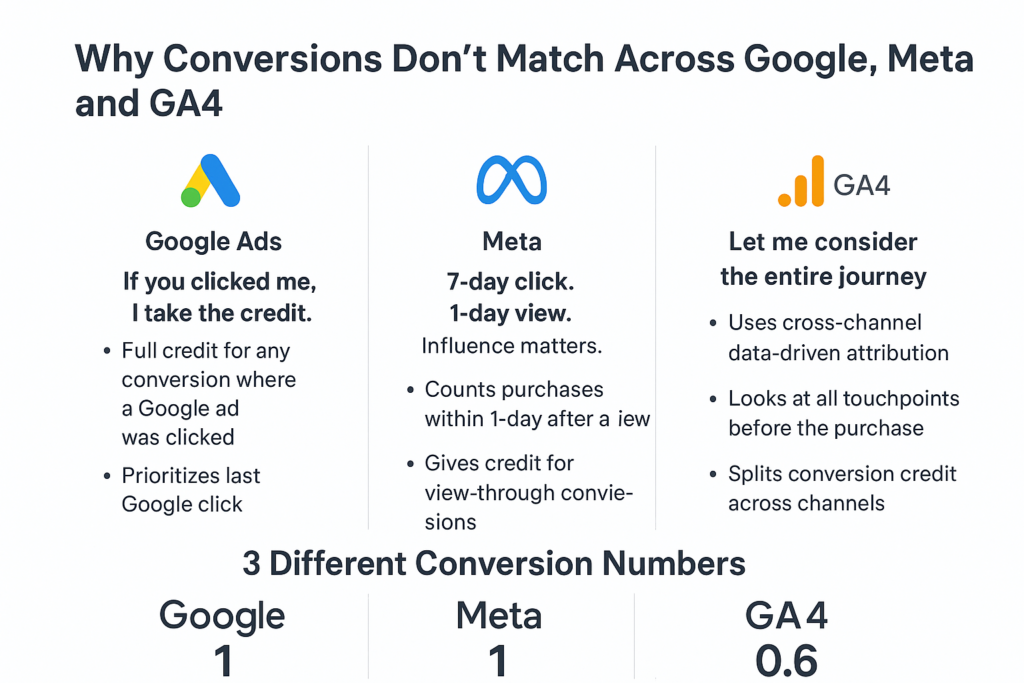
Google Ads
Google Ads has a very straightforward philosophy:
If the user clicked on a Google ad at any point before purchasing, Google Ads takes full credit.
Here’s an example:
- Someone clicks your Google ad today
- They don’t buy immediately
- Three days later, they come back organically and purchase
According to Google That conversion belongs to Google Ads – period.
Even though:
- The final interaction was organic
- The user didn’t come back through an ad
- Multiple channels may have influenced the decision
Google still claims 100% credit because it contributed earlier in the journey and the user interacted with Google’s ecosystem.
This is why Google Ads almost always shows higher conversions than GA4.
Meta Ads
Meta uses a slightly more flexible attribution window:
- 7-day click
- 1-day view
This means:
- If someone clicks your Meta ad and purchases within 7 days, Meta counts it.
- If someone just sees your ad (no click) and purchases within 24 hours, Meta still counts it.
Meta’s logic is more “influence-based” than “last-click based.”
Example:
- A user scrolls past your Instagram ad (no click)
- The next day they Google your brand and purchase
Meta says: They purchased within 24 hours of viewing my ad, So Meta counts the conversion.
This is why Meta often reports more conversions than GA4 – and sometimes even more than Google.
GA4
GA4 is the most “neutral” and “holistic” out of the three. GA4 won’t automatically give full credit to Google or Meta. Instead, it looks at the entire user journey and evaluates all channels involved.
GA4 uses cross-channel data-driven attribution, meaning:
If a user touched multiple sources – Google, Meta, SEO, Email – GA4 distributes credit proportionally.
Example:
Here’s a real-life customer journey:
- Saw a Meta ad (didn’t click)
- Searched on Google later and clicked a Google Ad
- Came back organically and purchased
Read more: When and How to Use Data-Driven Attribution Model in Marketing
2. Cross-device/browser tracking
Meta and Google can often link behavior across devices using logged-in IDs. Facebook reports that “more than 65% of conversions start on one device and finish on another” (because users stay logged into Facebook).
GA4, however, uses first-party cookies and Google Signals; without user login or consent, it may treat a mobile click and desktop purchase as two separate visits.
For example, Lighthouse reports that GA4 often fails to recognize a mobile ad click that led to a desktop sale, attributing it as “Direct” on desktop, whereas Facebook/Google will correctly credit the ad on the first device.
3. Privacy & cookies
Updates like Apple’s iOS 14+ have drastically limited tracking. With ATT (App Tracking Transparency), many users opt out of ad tracking, so Facebook’s pixel and Google’s cookies collect far less data. Moreover, if a visitor rejects cookies or uses an ad-blocker, GA4 can’t record the visit at all, even though Google Ads or Facebook might still log the ad click via server-side data or modeling. In practice this means platforms like Google Ads will often “model” missing conversions (using statistical inference), whereas GA4 only shows the observed conversions from accepted cookies.
Additional read: Server-Side vs Client-Side: A Marketer’s Overview
4. Event Deduplication Issues
If you send the same purchase event from:
- client-side browser pixel
- server-side tracking
- CRM / offline conversion import
without a proper event_id, platforms count it double. GA4 ignores duplicates, Meta doesn’t, Google Ads tries to dedupe but fails if parameters are missing. This creates a huge reporting gap.
How Conversion Mismatch Impacts Campaign Optimization
When your Meta Ads Manager shows 120 conversions, Google Ads shows 85, and GA4 reports only 60, the problem goes far deeper than “misaligned numbers.
These mismatches directly damage your campaign optimization in multiple ways:
1. Platforms Optimize Toward Different Events
- Meta might think the “Add to Cart” signals are strong and start pushing your campaign toward broad audiences.
- Google might think you’re barely getting conversions and keep the campaign in learning-limited mode.
- GA4 under-reports final purchases, so your ROAS looks weaker than it actually is.
When each platform thinks a different event is your “true conversion,” optimization gets fragmented.
2. Budget Allocation Becomes Inefficient
If Meta reports more conversions than GA4, you may:
- Over-invest in Meta thinking it’s performing better
- Under-invest in Google because it looks weak
Without a unified truth, your budget is distributed based on biased data, not performance.
3. Algorithms Get Incorrect Signals
Ad algorithms rely on conversion signals to:
- Identify high-value users
- Improve targeting accuracy
- Exit learning faster
- Optimize bids
- Expand into lookalike audiences
4. ROAS & CPA Reporting Becomes Unreliable
You can’t scale a campaign when:
- Google shows a 5X ROAS
- Meta shows 3X
- GA4 shows 1.5X
Which one do you believe?
Without a single-source-of-truth, ROAS becomes a guessing game.
5. Creative & Audience Decisions Become Flawed
If Meta attributes more conversions to Video Creative A – but GA4 credits Search instead – you might:
- Kill a high-performing creative
- Scale the wrong audience
- Pause a campaign that’s actually driving last-click revenue
Fixing Conversion Mismatches Across Meta, Google Ads, and GA4
Fixing Conversion Mismatches Across Meta, Google Ads, and GA4

- Server-side Tagging Setup: Move tracking to the server to bypass browser restrictions. For example, using Google Tag Manager’s server-side container or Meta’s Conversions API ensures conversions are sent directly from your server, reducing losses from ad-blockers and script failures.
- Aligning Attribution Models: Use the same attribution logic wherever possible. Google Analytics 4 (GA4) defaults to a data‑driven model, whereas Google Ads often uses last-click, and Meta by default counts conversions within a 7-day click (and short view) window.
- Consistent UTM Tagging & Naming Conventions: Ensure every paid campaign link includes properly formatted UTM parameters and that your team follows the same naming rules. Inconsistent UTMs will split traffic into multiple buckets and make GA4 figures messy.
For example, decide on a format (e.g. utm_source=facebook, utm_campaign=spring_sale) and apply it across ads. - Deduplication & Avoiding Overcounting: Prevent the same conversion from being counted twice. GA4 automatically de-duplicates by using a unique transaction ID: it won’t count a purchase more than once if the same ID is seen again
How EasyInsights.ai Solves Conversion Discrepancies
Real-time Server-Side Tracking & Event Forwarding: EasyInsights provides a server-side tagging solution. It collects conversions on your server (via its Pixel) and immediately forwards them to Meta, Google Ads, GA4, or any analytics tool you choose.
Cross-Channel Data Stitching & Journey Mapping: EasyInsights connects to CRMs, Google Analytics, Facebook, Shopify, email systems, and more, then merges that data by user ID to build a 360° profile
Data Cleansing & Deduplication Tools: Behind the scenes, EasyInsights cleans and normalizes your raw event data. It automatically fills in missing values, standardizes formats, and merges duplicate records so that each unique conversion is only counted once
Accurate Event Matching & Retroactive Sync: EasyInsights enhances matching by sending hashed customer identifiers (email, phone, Facebook click ID, etc.) with each event.
This dramatically boosts Facebook’s CAPI and Google’s enhanced conversions match rates (often improving them by 10–40%).
Conclusion
Conversion numbers will never match across Meta, Google Ads, and GA4 because each platform uses different tracking rules, attribution windows, and modeling. But you can fix the mismatch.
By using server-side tracking, consistent UTMs, and proper deduplication, you can unify your data and send clean, accurate conversions to every platform.
EasyInsights makes this seamless – stitching customer journeys, improving match rates, and giving you a single, reliable source of truth so you can optimize and scale with confidence.
Track your conversions with EasyInsights – Book a demo Today!